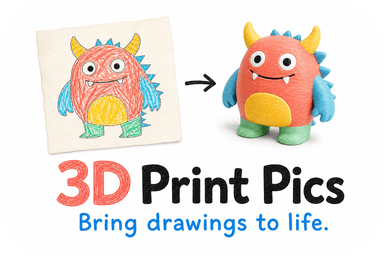
A 3D scan measures the real shape of an object with a dedicated sensor. A photo-based method (photogrammetry, or AI modeling from one image) rebuilds a shape from pictures. Scanning wins on geometric accuracy. Photos win on cost, color and convenience. For a keepsake such as a child's drawing, a pet portrait or a logo, you rarely need a scanner at all: one good photo is enough to get a printable model.
This guide explains where each approach is strong, where it breaks, and how to pick for the thing you actually want to hold in your hand.
TL;DR
- 3D scanners (structured light, laser, LiDAR) capture geometry and are best when exact measurements matter. Professional handheld units typically cost €10,000 to €25,000.
- Photo-based modeling needs only a camera or phone. It tends to look more realistic in color and fine detail, but it can hide scaling errors.
- Both struggle with shiny, transparent or featureless surfaces, and both depend heavily on the person doing the capture.
- For keepsakes, figurines and logos, you can skip scanning: upload one image, preview the model, then order. Our custom models run $49.99 to $77.99.
Table of Contents
- What each method actually does
- Photo vs 3D scan: side by side
- Accuracy: looks right is not the same as is right
- Where both methods fail
- The effort nobody mentions
- Which one fits your project?
- Our perspective: you probably do not need a scanner
- What a no-scan workflow looks like
- What it costs compared with scanning
- Ready to try it with a photo?
- FAQ
- Sources
What each method actually does
3D scanning
A scanner projects light, a pattern or a laser onto an object and measures how it comes back. That gives it its own fixed reference, which is the main difference from photogrammetry: a calibrated device with a light source versus data found in the scene. Structured-light and laser units are built for accuracy first. Phone LiDAR is the budget version of the same idea: an active sensor that emits its own signal.
Photogrammetry
Photogrammetry stitches many overlapping photos into a 3D shape and wraps the photos around it as texture. Matterport's comparison notes that it produces strong visual realism and dense detail, but needs consistent, shadow-free lighting. Glare, harsh shadows and blank surfaces can make it fail.
Photo-based modeling from a single image
This is the third option, and the one most people searching for "photo based 3D modeling" actually want. Instead of reconstructing a real object from dozens of angles, software generates a model from one image: a drawing, a pet photo, a logo. Nothing physical has to be captured from every side. That is how our service works, and it is why it suits flat or two-dimensional sources that no scanner could handle anyway. A drawing on paper has no shape to scan.
Photo vs 3D scan: side by side
| Criterion | 3D scanner | Multi-photo photogrammetry | Single-photo AI modeling |
|---|---|---|---|
| Equipment | Dedicated device, often plus a computer | Camera or phone plus software | Any photo or drawing file |
| Typical cost | Professional handheld: €10,000 to €25,000 | Software from free to roughly €3,000 | Pay per finished model |
| Geometric accuracy | Highest | Variable, depends on technique | Not for measurement; built for likeness |
| Color and texture | Often limited | Excellent | Chosen from a palette |
| Lighting sensitivity | Low for active sensors | High | Low, but a clear image helps |
| Skill required | Real, despite the marketing | Real | Minimal |
| Best for | Parts, reverse engineering | Realistic objects, scenes | Keepsakes, figurines, logos |
The cost figures come from a forensic imaging comparison and are European research-lab numbers. US street prices vary, so treat them as an order of magnitude.
Accuracy: looks right is not the same as is right
This is the most common mistake in the photo vs scan debate. A photogrammetry model often looks more convincing because high-resolution photos are wrapped around the shape. But the same LJMU study warns that a model can look perfect and still be off in scale: its example is an ear model about 5 mm smaller than the real thing. For a keepsake, that does not matter. For a replacement bracket that has to fit a bolt, it does.
Phones have closed much of the gap. A 2024 PLOS ONE study found that some smartphone apps reached very high reliability for volume measurements, while others did not meet the standard at all. The takeaway is that the software matters as much as the camera.
Researchers also point out the human factor. A 2026 paper on smartphone photogrammetry describes how the lack of standardized capture protocols leads to inconsistent results, which makes the method better suited to visualization than to mission-critical measurement without training.
Where both methods fail
Shiny metal, glass and plain monochrome ceramic are hard for everything. According to a heritage digitization study, these surfaces cause gaps in the data because the software or sensor cannot track the texture or light pattern. Fixes exist, such as cross-polarization or spray-on powders, but they add steps and cost.
If you plan to scan a pet, remember a practical problem: fur is fine and fuzzy, animals move, and a 30-second capture around a squirming dog rarely works. A photo is far easier to get.

The effort nobody mentions
Scanners are often sold as point-and-shoot. In practice they are operator-dependent: consistent distance, full angular coverage and steady movement all count, and the same source describes results as about half hardware and half technique.
Then comes cleanup. Bournemouth University researchers note that photogrammetry is not an automatic substitute for modeling: raw models need expertise to reduce polygon counts or fix texture errors before they are usable. A raw scan is also rarely print-ready. Holes, thin walls and noise have to be repaired first, which is why we wrote a guide on mesh repair before printing.
Which one fits your project?
Choose a 3D scanner when
- You need dimensions that match a physical part.
- You are reverse-engineering, repairing or inspecting something.
- You have the budget, or can rent time on equipment.
Professionals often combine both: scanning for geometry and photogrammetry for color, which Artec describes as the gold standard for high-stakes work, with the most expensive equipment and slowest pipeline.
Choose multi-photo photogrammetry when
- You want a realistic copy of a real object, such as a statue or a shoe.
- You are comfortable shooting 40 or more evenly lit photos and processing them.
- You can tolerate some trial and error.
Choose single-photo modeling when
- The source is a drawing, a logo, a character illustration or a pet photo.
- You want a gift, a desk piece, a classroom project or a promotional item.
- You want to see the model before paying for it, with no software to learn.
A quick rule: if the question is "how big is it exactly?", scan. If the question is "can I hold this memory?", use a photo.
Our perspective: you probably do not need a scanner
Most people who reach us have already looked at scanning and walked away. They have a child's crayon dragon, a photo of a dog who has passed, or a company logo on a PDF. None of these is a measurement problem. They are likeness problems.
So we built the process around the image. You upload it, choose colors (up to seven in non-toxic PLA), and see a model preview before you commit. The approval step is the point: with scanning you often discover problems after hours of processing, while with a preview you see the result first. If it is not right, you adjust the image or the colors, not a rig and a turntable.

We also think the line between photo and scan is blurrier than it sounds. Scans of real objects still start with photos, and the best results from any method come from clear, well-lit source material. Our practical advice is the same whatever you choose: use even light, avoid glare, and give the subject a clean background. For drawings, a flat top-down shot beats an angled one. Our guides on turning a drawing into a 3D model and preparing a photo for paintable prints go through this step by step.
One honest limit: a keepsake is not a measuring tool. If a part must fit something, scan it or measure it by hand.
— Ian
What a no-scan workflow looks like
Here is how a photo becomes a printed piece with us, as outlined in our three-click preview guide:
- Upload a photo, drawing or logo. Higher contrast and a clean background help.
- Pick colors and size from the options on offer.
- Review the 3D preview and approve it, or change it.
- Order, and receive the print at your door.
For line art and logos, you can choose between vector formats and skip CAD entirely, as covered in our note on SVG and AI for line art. For a deeper look at the idea of replacing a scan with a photo, see turning one photo into a figurine without scanning. If color is your priority, our multicolor printing comparison explains the setups.
What it costs compared with scanning
Buying a professional scanner is a five-figure decision. Even a DIY photogrammetry route has hidden costs: a decent camera or phone, software, a computer that can process hundreds of megapixels, your time, and then a printer or a print service for the result.
Our custom 3D models are priced from $49.99 to $77.99, one-off. Rush processing is an extra $10. For how those numbers compare with what small buyers typically pay elsewhere, see our cost breakdown. For classroom and PTA use, the school printing guide is the better starting point.
Ready to try it with a photo?
If you have a drawing, a pet photo or a logo you want in your hands, you can upload it at 3D Print Pics, choose your colors and preview the model before you order. Prints use non-toxic PLA, and rush processing is available for $10 if you have a deadline.
FAQ
Is a scan better than a photo?
For measurement, yes: a scanner captures true geometry, while a photo-based model can look right and still be slightly off in scale. For appearance, color and keepsakes, a photo is often better and far cheaper. Pick based on whether you need precision or likeness.
What are the disadvantages of using a 3D scanner?
Cost is the first: professional handheld units are in the €10,000 to €25,000 range. Results also depend on operator technique, and shiny or transparent surfaces create gaps. Raw scans usually need cleanup before they can be printed.
What is better, LiDAR or photogrammetry?
LiDAR works in low light or darkness but often gives lower point density. Photogrammetry gives richer detail and realism but needs steady, shadow-free light, according to Matterport. Use LiDAR for rooms and spaces, photogrammetry for detailed objects.
Can I 3D scan with my phone camera?
Yes, and some apps perform well in published tests, but results vary a lot by app and technique. For a printable keepsake, you can skip scanning and upload a single photo or drawing instead.
Sources
- Dickinson et al., affordances of 3D imaging modalities (LJMU)
- PLOS ONE: smartphone 3D scanning accuracy
- Matterport: LiDAR vs photogrammetry
- Smartphone-based automated photogrammetry, Sensors 2026
- Bournemouth University: photogrammetry and 3D modeling
- ISPRS: digitization of reflective heritage objects
- 7 things you should know about photogrammetry vs 3D scanning
- Photogrammetry vs 3D scanning for creating a 3D model
- 3D Scanning vs. Photogrammetry, Part 1: The Theory