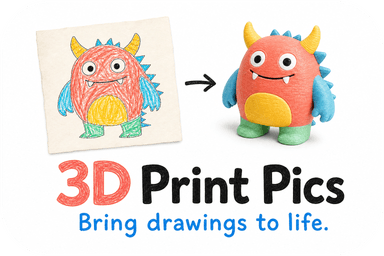
Paintable 3D prints are custom keepsakes made from your photos, drawings, or logos that arrive ready for paint after you review and approve an AI-generated preview. You upload an image, see a 3D model before it's printed, and receive a physical piece shaped for painting. 3D Print Pics turns this process into a straightforward online order.
TL;DR:
- Use a high resolution, well lit image with one centered subject and a plain background; scan drawings and crop closely to preserve clear outlines.
- Because one photo cannot show hidden sides, inspect likeness, symmetry, stability, and thin parts in the preview; request focused fixes before approving.
- PLA is a common lower temperature choice, but printing can release respirable particles; ask about ventilation, airing before shipping, and detachable parts for young children.
- Larger, more detailed models and extra colors increase print time and cost; rush processing carries a $10 fee, while base prices appear online.
Table of Contents
- What paintable 3D prints are and how image-to-3D keepsakes work
- How to prepare a photo or drawing for the cleanest 3D conversion
- Materials and safety: PLA, emissions, and what to ask your provider
- Sizing, pricing, and turnaround: what affects cost and delivery
- Preview and approval: how to review the AI-generated model and request changes
- Finish and paintability: what the delivered print needs (and doesn't need) before painting
- Ordering checklist: step-by-step actions from upload to delivery
- Author perspective: why previews, PLA, and simple checks make keepsakes reliable
- How 3D Print Pics helps: quick pitch and how to start an order
- FAQ
- Sources
What paintable 3D prints are and how image-to-3D keepsakes work
In this sense, a paintable 3D print is not a downloadable miniature file for hobbyists to print at home. It's a personalized object built from a single photo, a child's drawing, or a business logo, generated through AI reconstruction and shipped to you as a physical keepsake.
Single-image reconstruction has real limits. An algorithm can only guess at the sides of a face or object it never saw in the source photo, so results are a probabilistic estimate rather than a scan. That's why a preview step matters: you see the proposed shape before anything gets printed.
"Paintable" in practice means the surface arrives in a state ready for basic prep work, not raw off the printer:
- A cleaned surface with support material removed
- Smoothed transitions where layers would otherwise show
- A base or mounting point stable enough to handle during painting
How to prepare a photo or drawing for the cleanest 3D conversion
The quality of your source image drives the quality of the model. Clear, well-lit, single-subject photos against a plain background produce the cleanest geometry and the fewest surprises in the first preview.
- Use a high-resolution image with the subject facing forward and centered.
- Shoot or scan against a plain, contrasting background with no clutter behind the subject.
- Avoid harsh shadows or uneven lighting that can confuse edge detection.
- For children's drawings, scan the page when possible instead of photographing it, and crop tightly to the artwork.
- For logos, upload the highest-resolution file available, ideally a vector export flattened to a clean image.
- Stick to common file formats like JPEG or PNG and avoid heavily compressed or resized files.
Pro Tip: Zoom in on your image before uploading and check that outlines and fine lines are thick enough to read clearly. Thin, faint lines tend to disappear or distort once converted into 3D geometry.
Materials and safety: PLA, emissions, and what to ask your provider
Non-toxic PLA is a common choice for custom keepsakes because it prints at lower temperatures than materials like ABS and doesn't require the same ventilation precautions during fabrication. "Non-toxic" refers to the base resin, not a guarantee that the printing process itself has zero airborne emissions.
EPA research finds that common filaments, including PLA and ABS, release respirable particles during printing, with exposure varying by filament type and room ventilation. Indoor modeling has found potential volatile organic compound concentrations in a residential living room from a single printer running, varying widely depending on filament and setup, according to EPA research. Separate peer-reviewed modeling on desktop FDM printers shows that ultrafine particles can deposit differently in the respiratory tracts of children versus adults, which matters for keepsakes made in shared or home spaces.
If you're buying for a child, a few questions are worth asking any provider:
- Is printing done with ventilation or enclosed, filtered equipment?
- Are finished prints aired out before packing and shipping?
- Are small, detachable parts avoided on pieces meant for children under 36 months?
Sizing, pricing, and turnaround: what affects cost and delivery
Size, geometric complexity, and the number of color choices all affect both price and print time. A simple logo plaque prints faster and costs less than a detailed figure with thin limbs or overhangs that need extra support material.
- Larger and more detailed models take longer to print and post-process.
- Color changes add print time since each color typically requires a pause or a separate pass.
- Rush processing is available for $10 one-off when you need a faster turnaround, through 3D Print Pics.
The typical sequence runs from AI preview to your approval, then printing, post-processing, and shipping. For a durable piece meant to be handled often, a slightly larger, chunkier size holds up better than a small model with fine, breakable detail.
Preview and approval: how to review the AI-generated model and request changes
Because single-view reconstruction is inherently ambiguous about geometry it never directly saw, computer vision research on this exact problem confirms that previews are the buyer's main safeguard against surprises. Treat your preview as a checkpoint, not a formality.
- Check facial or key features for likeness and proportion.
- Look for symmetry issues on sides the original photo didn't show.
- Confirm the base feels wide enough for the model to stand without tipping.
- Flag any thin parts, like fingers or ears, that look fragile and may need thickening.
- Note any color or shading hints you want carried into the final print.
Reasonable revision requests fix specific issues like a thin part or a proportion problem. A full redesign from a different photo is a new order, not a revision.
Finish and paintability: what the delivered print needs (and doesn't need) before painting
Before shipping, prints go through support removal and light sanding to smooth the surface, which helps paint grip evenly instead of pooling on rough or uneven layers.
- Support removal clears away the scaffolding used to print overhangs.
- Light sanding knocks down visible layer lines on the surface.
- A primer-ready surface means minimal extra prep is needed before the first coat.
- Acrylic-based paints generally suit PLA keepsakes well, since they adhere without needing harsh solvents.
Ordering checklist: step-by-step actions from upload to delivery
A custom order from 3D Print Pics follows a short, predictable path:
- Upload your photo, drawing, or logo.
- Choose size, color, and any finish options.
- Review your AI-generated 3D preview carefully.
- Approve it, or request a specific revision before moving forward.
- Check out and select standard or rush shipping.
In your order notes, mention any pose preference, specific color guidance, or a note that the piece will be handled by young children. Review the preview closely since it's your main checkpoint before production, and check the site's returns policy if you have questions about changes after approval.
Author perspective: why previews, PLA, and simple checks make keepsakes reliable

Working through image-to-3D workflows repeatedly, the preview step stands out as the single most valuable safeguard in the entire process. It's the one moment a buyer can catch a proportion problem or a fragile thin part before it's permanent.
PLA's lower printing temperature and simpler handling make it a sensible default for family keepsakes, not because it eliminates every variable, but because it reduces several at once. Simple checks, a clear photo, a careful look at the preview, a quick question about ventilation, do more for the final result than any amount of worry after the fact.
— Ian
How 3D Print Pics helps: quick pitch and how to start an order
Turning a photo, a child's drawing, or a logo into a physical keepsake works best when the preview, materials, and pricing are all clear before you commit, and that's the structure built into ordering with 3D Print Pics.

- Upload your image and get an AI-generated 3D preview before anything prints.
- Choose from multiple color options in non-toxic PLA.
- Custom models are offered at various price points; please see the provider's site for current pricing and rush processing fees.
Start your order on the 3D Print Pics product page and see your preview before you pay for the final print.
FAQ
What does "paintable 3D print" mean for a custom keepsake?
It means a personalized 3D model made from your photo, drawing, or logo that arrives with a surface prepped for painting, typically after support removal and light sanding. It's different from a downloadable hobbyist file since the model is generated specifically from your uploaded image.
Is PLA safe for a keepsake meant for a child?
Non-toxic PLA is a common, lower-temperature material choice for printed keepsakes, though EPA research notes that printing itself can still release particles depending on filament and ventilation. For pieces meant for young children, ask about small detachable parts and whether the item is meant for children under 36 months.
How long does a custom 3D print order take to arrive?
Turnaround depends on size, color count, and detail level, with the process moving from AI preview and your approval through printing, post-processing, and shipping. Rush processing is available for $10 one-off through 3D Print Pics if you need a faster turnaround.
Why does my model need an approval step before printing?
Single-image 3D reconstruction is inherently uncertain about angles the original photo didn't capture, which is why research on single-view reconstruction treats the preview as essential rather than optional. Reviewing the preview lets you catch proportion issues or fragile thin parts before anything is finalized.
What paint works best on a finished 3D printed keepsake?
Acrylic-based paints generally adhere well to PLA surfaces that have been lightly sanded, without needing harsh solvents. For raised detail or fine lines, a smaller brush and thinner paint layers tend to hold up better than thick coats.
Sources
The safety and materials guidance above draws on government and peer-reviewed research into 3D-printing emissions, exposure, and structural design.
- 3D Printing Research at EPA | US EPA
- 3D Printer Particle Emissions: Translation to Internal Dose in Adults and Children - PMC